Saturday, November 3, 2012

Google search experiment integrates Google Drive, Calendar

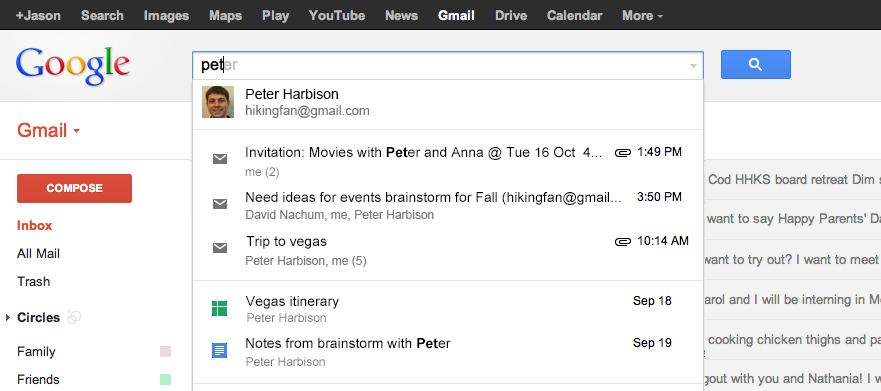
Google recently announced an updated search experiment that lets you integrate documents from Google Drive and Calendar appointments into your searches on Google.com and Gmail. Integrated search will also include improvements to Gmail's new autocomplete feature including results from Drive, Calendar, as well as e-mail. Frequent fliers will also see an improved flight tracking feature that includes current flight information on Google.com for any upcoming flights with itineraries saved in Gmail.
Google's new integrated search experiment expands the company's field trial launched in August that brings together results from your Gmail account into your own searches on Google.com. In October, Google also added the ability for Gmail users to search text and data inside attachmentsthat use common file formats such as PDF, DOC (Microsoft Word), and PPT (PowerPoint).
Google's new beta test requires you to sign up at the integrated search field trial page, even if you're already participating in the current Gmail-search mashup. The new feature is only available in English and only for @gmail.com addresses. Google says the field trial has limited space and the company may not be able to accommodate every person interested in the experiment. Once you've signed up, Google will send you an e-mail when your account is activated for the new trial. You have to be signed in to your Google account to use the new feature, and your personal data will only appear in your search results, not someone else's.
Google's new field trial is an example of the integrated services the company is hoping to roll out after the company unified most of its user privacy policies in March. But Google's changes are starting to face challenges from European consumer protection authorities. On Tuesday, France's National Commission on Information Technology and Civil Liberties, on behalf of European data protection authorities, asked Google to “ modify its practices when combining [user] data across services.” The commission issued three main recommendations for Google:
  • “reinforce users' consent” to the combination of data for new and improved services, advertising and analytics.
  • provide an opt-out mechanism for users that don't want to combine data across services; and allow more user control over which services can combine data.
  • “adapt the tools used by Google for the combination of data so that it remains limited to the authorized purposes.”

Google Drive 1.5.3449.3345 | Download Google Drive

Google Drive is a place where you can create, share, collaborate, and keep all of your stuff. Whether you’re working with a friend on a joint research project, planning a wedding with your fiancĂ© or tracking a budget with roommates, you can do it in Drive. You can upload and access all of your files, including videos, photos, Google Docs, PDFs and beyond.
Features:
  • Create and collaborate. Google Docs is built right into Google Drive, so you can work with others in real time on documents, spreadsheets and presentations.
  • Store everything safely and access it anywhere (especially while on the go). You can access your stuff from anywhere—on the web, in your home, at the office, while running errands and from all of your devices.
  • Search everything. Search by keyword and filter by file type, owner and more. Drive can even recognize text in scanned documents using Optical Character Recognition (OCR) technology or images using image recognition.
You may need to install Microsoft Visual C++ 2008 SP1 Redistributable Package to run this software.

http://www.filehippo.com/download_google_drive/download/a876e9b4bd41320800e3211ce29cdf1e/

Google Drive Files Open To Share On Google+

Drive has enhanced its file-sharing capabilities with Google+, allowing users to easily share their documents, images, presentations with the outside world.
The new sharing capabilities for Drive, which were already available in Google+, were unveiled in an 31 October post by Li-Wei Lee, a Google software engineer, on the Google Enterprise Blog.

Interactive Sharing

“Starting today, you can also share the work you create and store in Google Drive, and people will be able to flip through presentations, open PDFs, play videos and more – directly in the Google+ stream,” wrote Lee.  “Forms shared in the stream, like feedback surveys or lunch order polls, are interactive as well and can be completed with just a couple of clicks.”
To share content from Drive to Google+, users can paste the link for the Drive file directly into the share box inside Google+, according to Google. Users of Google Apps for Business, Education or Government can make the post restricted to ensure that the discussion is only visible to people in your organisation.
The new Google Drive features are the latest additions to a Google service that was launched 24 April after about six years of planning and talks about its intentions to introduce a cloud storage service.
In September, Google updated its Drive services for Android and iOS users to make it easier for them to modify documents on the go, see changes by others and view presentations.
Apple device users gained the ability to edit Google documents for the first time, and could now see other people’s edits instantly as they are made. Apple iOS users also gained the ability to view Google presentations on an iPhone or iPad, including speaker notes, full-screen mode and to swipe to see the next slide.
Android users gained improvements, including the ability to add comments, reply to existing comments and view tables inside Google documents.
Google Drive can be downloaded from Apple’s App Store for iPhone, iPad or iPod devices, and from the Google Play Store for Android phones or tablets.

Cloud Storage

The Drive offering joined a busy cloud storage marketplace that was already packed with competitors such as Box and Dropbox.
Google Drive offers users up to 5GB of storage for free and is integrated with Google’s core services, such as Google Docs, where users can do their work and then seamlessly store it in their part of the cloud for safekeeping and easy access.
In June, Google added Apple iOS support for Drive, which wasn’t originally available when the service debuted. Drive now supports iOS, Windows and Google’s Chrome OS operating systems.
Google Drive also includes support for a wide variety of file formats, even if the applications aren’t installed on the user’s device. That allows users to open the files for viewing as needed.
Drive proved to be very popular among users just after its launch. Sign-ups for the service grew to a “very strong start, with probably about 35 million to 40 million sign-ups in 15 days,” according to an earlier report.
Google provides free storage for up to 5GB in Google Drive. Extra storage is priced as follows: 25GB: $2.49/month (£1.54); 100GB: $4.99/month (£3.10); 200GB: $9.99/month (£6.20); 1TB: $49.99/month (£31.05); 16TB:$799.99/month (£497.10). Other increments below 16TB are available.
Google Drive Apps Added to Chrome Web Store


Google is making it easier to access its Drive cloud-storage service on the Chrome browser, bringing its Documents, Spreadsheets, and Presentations apps to the Chrome Web Store.
Starting today, the programs - now known as Docs, Sheets, and Slides - are available in the Chrome store. Add them to your browser for one-click access whenever you open a new tab. Drawings, Forms, and Script apps are also available.
On the Chromebook, Google said Docs, Sheets, and Slides will be listed by default on Chrome in the next few weeks.
Google Drive, formerly known as Google Docs, launched in April, and provides up to 5GB of free cloud storage for documents, videos, photos, and more.
While it took Drive only a few months to make the jump into the Chrome store, Docs has been hanging around for six years. PCMag sister site Geek.com pointed out that the wait may have been due in part to the lack of offline editing, which was introduced only this summer. Now that all three programs can run without Internet access, it makes more sense to integrate them into the Chrome OS hardware, Geek said.
While Chrome has picked up steam among Web users, Google has had less success with its Chromebooks $744.57 at Amazon Marketplace. Last week, however, it unveiled the $249, ARM-based Samsung Chromebook, a low-cost option that might appeal to a broader audience. For more, see the slideshow below.
Meanwhile, Google's three-year-old whatbrowser.org has been completely rebuilt in HTML5, available in 43 languages, and now works on mobile, too. The site originated as a way to help people learn about the importance of browser choice, and has evolved into a mechanism to ensure that users know and understand which browser version they are running. It also highlights the importance of using a modern browser and keeping it up to date — to save time, stay safer, and open online possibilities.

Google Drive files can now be shared via Google+

Users can now share files from their Google Drive storage account on their Google+ social networking profile, a capability that could be particularly relevant for workplace collaboration.
Users can share links to any file stored in Drive, including text documents, spreadsheets, slide presentations, forms and video clips, Google said on Wednesday.
Their Google+ contacts will be able to click on a thumbnail within the Google+ interface and open the file in a separate browser window.
Drive files can be shared on Google+ in different ways. Users can copy the URL of the Drive file and paste it into the share box in Google+. Another option is to share it on Google+ using the Drive share feature, which now includes Google+ as a destination option.
When shared on Google+, each file carries with it the access settings their owner gave it on Drive. Users can define which Google+ contacts they want to share a file with.
People who use Drive and Google+ at work as part of the Google Apps cloud email and productivity suite can also restrict posts to colleagues within their organization.
In fact, the integration could help push the business value of Google+ within Google Apps, where it is expected to become eventually a full-fledged enterprise social networking (ESN) system.
ESN software, such as Microsoft's Yammer, NewsGator's Social Sites, Salesforce.com's Chatter, Tibco's Tibbr and Jive's Social Business, provides social media features like the ones on Facebook and Twitter but adapted for workplace collaboration.
Google Apps needs an ESN component, and Google has been taking steps to adapt Google+ for that purpose.
Google first made it possible for Apps administrators to offer Google+ to their users, and has also provided IT controls to centrally establish access settings to Google+ posts and Google+ multiparty videoconferencing sessions.
Google also lets Google+ users add links to videoconferencing sessions—called Hangouts in Google+—to a Calendar event, so that participants can join directly from the Calendar invite or entry.

Sunday, June 17, 2012

CloudLock Brings PCI Compliance Scan to Google Drive


CloudLock will announce its pattern matching engine for Google Apps customers on Tuesday, bringing Payment Card Industry (PCI) and other compliance requirements to Google Drive.
Available as a cloud service, the company’s engine “identifies, classifies, and secures very sensitive information, including Personally Identifiable Information (PII), Payment Card Industry (PCI) data and custom regular expressions…,” it said in a statement. CloudLock’s PII and PCI Compliance Scan identifies files containing Social Security numbers and credit card information, as well as product SKUs and postal codes.
“As more companies move to the cloud, more sensitive data follows, including PII and PCI data that is subject to auditing and compliance requirements,” said Gil Zimmermann, CEO and co-founder of CloudLock. “Customers now have a way to implement and enforce Acceptable Usage Policies; whether that entails securing sensitive data or preventing its dissemination to certain applications and users in the first place.”
CloudLock said the features in the new compliance scans came from customer requests. One such company, AMAG Pharmaceuticals, touts how the service keeps them on the right side of the law. Nathan McBride, vice president of IT at AMAG, said in a statement: “As a publicly traded pharmaceutical company, we face the challenge of complying with SOX and FDA regulations as well as protecting our IP. With CloudLock’s pattern matching engine, we’re able to identify PII as well as very sensitive data related to our intellectual property…”
Other customers were looking to allow cloud-based collaboration for staff, but still keep personally identifiable information out of the public domain.
Joe Fuller, VP/CIO, Dominion Enterprises, said, “We wanted to make things easier but we didn’t want our sensitive data being compromised. CloudLock gives the visibility we need to identify, classify, monitor and eliminate any employee’s risky sharing behavior in the Google Apps cloud.”

http://www.wired.com/cloudline/2012/06/cloudlock/

Cloud storage: How useful is Google Drive?

Did you know that you store a lot of your personal and official information on a cloud? Where do you think all the attachments in your web mail accounts are stored? However, when it comes to consciously storing data and accessing it, most of us prefer a USB flash drive or, if the data is sizeable, a portable hard disk drive (HDD). Now, Google Drive aims to change this since it is not just a warehouse, but also offers a bunch of applications.

Google Drive to get offline mode in five weeks

Sundar Pichai, senior vice president for Chrome and Apps at Google, stated that the Google Drive will get offline mode in five weeks.
On the sidelines of the D10 Technology summit, Pichai told 'All Things D' author Walt Mossberg that Google's online storage service (Drive) will get offline support in five weeks from now. That means we can anticipate the offline mode in the first week of July.
Google Drive is one of the online storage service based on cloud servers, allowing users to upload content anywhere through web or dedicated apps meant for PC and mobiles. Though Google Drive may appear bit less glamorous than other online storage services, the company plans to bring offline storage for the same.
Google Drive to get offline mode in five weeks
The Google Docs is already slotted under the Google Drive umbrella and already offered offline support. Now Google Drive will get offline mode after five weeks. Dropbox already offers offline storage and functionality.
Google Drive app is available from Google Play store and also for PC as well as Mac.

http://ibnlive.in.com/news/google-drive-to-get-offline-mode-in-five-weeks/263806-11.html

Livedrive CEO Says Paying for Google Drive or SkyDrive is Like Paying Tax

The CEO of Livedrive, one of the leading cloud storage services for consumers and small business, today posted a blog post explaining why he is not worried by competition from Google Drive and Microsoft's SkyDrive. Both services offer cloud storage under a 'freemium' model - meaning that users can use a certain amount for free, and then have to pay if they want extra space. Livedrive has always offered services as a paid for product, with no free tier.
In the blog post, Andrew explains that, "Paid-for services like Livedrive can offer far better deals to paying users because we don’t have the cost of servicing millions of free users. When you have a freemium model you have to set the usage bar for paying quite low to make the numbers work... and the price has to be high because only small percentage of users will chose to pay."
Freemium is a popular marketing technique among web companies - allowing companies to take advantage of the viral and social nature of their large free users bases, with the expectation that some of their free users will become paying customers. Andrew argues that the paying customers of these services are paying far more than they need: "Paying for Dropbox, SkyDrive or Google Drive is like paying tax. Our message is simple – by all means enjoy a free service if it meets your needs, but if you’re going to pay, then come to a paid for service like Livedrive."
Andrew - who previously founded the UK's largest hosting provider, Fasthosts - explains how a similar pattern has been seen in both the internet services and hosting industries. In both of these segments free players dominated the early market, but then as the market matured customers grew used to paying for them. Andrew wrote:
"When I started Fasthosts in 1998 most people thought web hosting would be a free service – the likes of AOL and Geocities were offering free hosting and it wasn’t unusual to find professionals and small businesses alike using them. Then, as the market matured the word on the street was that ‘only prosumers will pay for web hosting’. What actually happened is that as the Internet grew people’s needs grew and users had all sorts of preferences – in the case of web hosting that meant things like support, speed, domain names, server features etc. Now, even a home user who just wants a website to rent out his holiday home will most likely be using a decent, good value, paid for service as opposed to a one size fits all freebie."
Livedrive are an award winning UK-based provider of online backup and cloud storage services, providing solutions for consumers, small business and resellers.
Andrew Michael's full blog post is available here:
http://blog.livedrive.com/2012/06/freemium-vs-paid-a-different-perspective-on-cloud-storage/

PCI compliance scan for Google Drive

CloudLock announced a pattern matching engine that identifies, classifies, and secures sensitive information, including Personally Identifiable Information (PII), PCI data and custom regular expressions, allowing Google Apps customers to address auditing and compliance requirements in Google Drive.

PII is data that can be used to uniquely identify, contact, or locate a single individual. CloudLock’s PII and PCI Compliance Scan allows customers to identify files containing Social Security Numbers, Credit Card information as well as any custom patterns/regex that they can define such as Product SKUs, postal codes or any other pattern.

“As more companies move to the cloud, more sensitive data follows, including PII and PCI data that is subject to auditing and compliance requirements. With CloudLock’s pattern matching engine, customers can identify data containing PII, classify it as such and take action. Customers now have a way to implement and enforce Acceptable Usage Policies; whether that entails securing sensitive data or preventing its dissemination to certain applications and users in the first place.” said Gil Zimmermann, CEO and Co-founder of CloudLock.

Enterprises handling sensitive data, including personally identifiable information, have a responsibility to protect access to this information regardless of whether the information is kept on-premises or in a cloud-based provider.

Moving to the cloud doesn’t remove this responsibility, nor does it shift it solely to the cloud provider– enterprise security policies must be extended to cloud-based information and we need to be able to show compliance with these policies,” said Neil MacDonald, vice president and Gartner Fellow.

http://www.net-security.org/secworld.php?id=13092

Wednesday, May 30, 2012

Samsung Chromebook & Chromebox review

Google Debuts Latest Chromebook, New Chromebox

Chromebook: The (always) new computer

Google Intros 2nd-Gen Chromebook, Chromebox

On Tuesday Google announced the launch of two new 2nd-generation Chrome OS products: the Samsung Series 5 Chromebook laptop and the Samsung Series 3 Chromebox desktop. They're based on Intel Core processors and feature support for hardware accelerated graphics, a built-from-scratch multi-touch trackpad, and a boot time of less than seven seconds.
"This is the next step in our journey toward an always-new computing experience focused on speed, simplicity and security," said Caesar Sengupta, Director of Product Management at Google. "This next-generation hardware from Samsung based on Intel processors and hardware-accelerated software delivers nearly three times the performance of the first-generation Chromebooks. With a new, app-centric user interface rolling out today and thousands of available web apps, we couldn’t be more excited about this evolution."
The Chromebook arrives in two flavors: Wi-Fi only (XE550C22-A01) and Wi-Fi + 3G (XE550C22-H01). The tech specs include a 12.1-inch screen (1280 x 800), a dual-core Intel Celeron 867 processor clocked at 1.3 GHz, 4 GB of SoDIMM RAM, a 16 GB SSD, an integrated Intel HD Graphics 3000 GPU, a built-in 1MP HD webcam, 802.11 a/b/g/n connectivity, and a battery life of up to 6 hours. Ports include 2 USB 2.0, a 4-in-1 memory card slot, a DP++ port (2560 x 1600), Gigabit Ethernet and more.
The Series 3 Chromebox (XE300M22-A01) can be connected to up to two 30-inch displays simultaneously. It packs a dual-core Intel Celeron B840 processor clocked at 1.9 GHz, 4 GB of SoDIMM RAM, a 16 GB SSD, 802.11 a/b/g/n connectivity, Gigabit Ethernet and an Intel HD Graphics 3000 GPU. Ports include six USB 2.0, two DP++ display out ports (2560 x 1600) and a combined headphone/microphone jack.
"The new Samsung Series 5 Chromebook and Series 3 Chromebox provide the rapid, convenient and ever-improving computing experience that was so well-received in our first Chromebook," said Todd Bouman, vice president of marketing at Samsung Enterprise Business Division. "As the world’s first Chromebox, the Series 3 provides users with the Chromebook’s ease-of-use in a compact desktop product, which easily integrates with their existing accessories."
Google's blog on Tuesday talks about the updates in Chrome OS including a revamped media player and a built-in photo editor and uploader so that users can easily play and manage personal media collections. Google Drive is now seamlessly integrated with the File Manager and will support offline access with the next release of Chrome OS in six weeks. Google Docs offline support is also rolling out over the next few weeks.
"We’ve released eight stable updates over the past year, adding a number of major features and hundreds of improvements to all Chromebooks through our seamless auto-update mechanism," Google adds. "There’s a lot more on the way, so all you need to do is sit back and enjoy the benefits of the (always) new computer."
The company added that it's expanding the Chrome Zone experience centers in the United States, available for hands-on trials in select Best Buy stores in the coming weeks. The new Chromebook and Chromebox can be purchased now through Google's online retail partners in the U.S. and U.K., and in other select countries over the coming weeks.
As for pricing, the Wi-Fi only Samsung Series 5 Chromebook 550 costs $449.99 USD, whereas the Wi-Fi + 3G model costs $549.99 USD. The Chromebox is a mere $329.99 USD.

Google Drive: Cloud service or emerging OS? | Google Drive News

Google Drive is a free synching and file storage service that is the foundation for a comprehensive cloud service. Google’s big cloud initiative is starting to form more cohesively. 
Cloud Computers: Samsung developed google Chromebox and Chromebook computers are purely cloud terminals
Is Google Drive aiming to be the best cloud solution or is it a new OS in the making?
Google has always been about cloud computing. Their popular services like Picasa image sharing and gMail have always been server-based cloud apps that were accessible from any connected computer. Google Docs, their version of Microsoft Office, was likely a web-based cloud service that offered a free suite of applications such as a word processor, spreadsheet, database and presentation software that could work on virtually any computer and for free!
The best feature about Google Docs was the collaborative nature. Documents can be worked on by multiple users concurrently and in real time. If any of those computers fail, get lost or are stolen, then the documents are safely stored in the cloud, accessible from any terminal. Google Docs is now known as Google Drive.
Google Drive has been around for roughly a month. Most users gravitate towards the service because as an extension of Google Docs, it is a convenient and easy to use system, specially for collaborating on documents as well as sharing files so that they are accessible from various devices.
Google Drive gives users 5GB of free storage which can be expanded to 25GB for a nominal monthly fee of US $ 2.50.
The Chromebox features an Intel Core processor, 4GB of RAM and uses the cloud for storage
Google Drive also allows users to download desktop clients (it is available for Mac and PC)  which places some files on their computers. The desktop client synchronizes remotely with the server version so users can maintain the lastest iteration of the documents they are working on locally and on the cloud.
They announcement today that a new version of Google’s Chrome OS will be accompanying new hardware from Samsung in the form of a a Chromebox desktop PC and a new and improved version of the Chromebook.
I tested last year’s Google Chromebook as a personal machine and used it (or, rather tried to use it) as my mobile computer for a month. While the browser basedOS was fast and seemed capable of handling basic computing tasks, I found working with documents quite frustrating.
Without any ‘offline mode’ it was impossible to work on Google Docs documents away from a WiFi connection. I also encountered various issues with the actual cloud service being down or inaccessible. This made it impossible for me to do my work or access my files.
The experience just felt too much like amateur hour and I could not see this solution being used in businesses or mission critical situations.
Since then, Google has bolstered Google Docs and introduced Google Drive. It has also updated Chrome OS and released these new notebooks and desktops that all seem to fit into this growing ecosystem. What’s Your Tech? Is a cheaper  and cloud connected alternative to Windows and Mac an attractive solution for you or is cloud computing for the birds?

Google, Samsung unveil new version of Chromebook

San Francisco: Google will try to win more converts to a computer operating system revolving around its popular Chrome Web browser with a new wave of lightweight laptops built by Samsung Electronics.
Tuesday's release of the next-generation Chromebooks will give Google and Samsung another opportunity to persuade consumers and businesses to buy an unconventional computer instead of machines running on familiar software by industry pioneers Microsoft Corp. and Apple Inc.
Unlike most computers, Google's Chromebooks don't have a hard drive. They function like terminals dependent on an Internet connection. The laptops come with 16 gigabytes of flash memory - the kind found in smartphones, tablet computers and some iPods. Two USB ports allow external hard drives and other devices to be plugged into the machines.
Google, Samsung unveil new Chromebook, Chromebox
Chromebooks haven't made much of a dent in the market since their debut a year ago. In that time, more people have been embracing Apple's iPad and other tablet computers - a factor that has contributed to a slowdown in sales of personal computers.
The cool reception to Chromebooks has raised questions about whether Google misjudged the demand for computers designed to quickly connect to its dominant Internet search engine and ever-expanding stable of other online services, ranging from email to a recently introduced file-storage system called Drive.
"The Chromebooks have had less to offer than tablets, so they haven't been that interesting to consumers," said Gartner analyst Mika Kitagawa.
Google says it always intended to take things slowly with the Chromebooks to give its engineers time to understand the shortcomings of the machines and make the necessary improvements.
"This release is a big step in the journey to bringing (Chromebooks) to the mainstream," said Sundar Pichai, Google's senior vice president of Chrome and apps.
The upgraded laptop, called "Series 5 550," is supposed to run two-and-half times faster than the original machines, and boasts higher-definition video. Google also added features that will enable users to edit documents offline, read more content created in widely used Microsoft applications such as Word and Excel, and retrieve material from another computer at home or an office. More emphasis is being placed on Chrome's Web store, which features more than 50,000 applications.
The price: $449 for models that only connect to the Internet through Wi-Fi and $549 for a machine that connects on a 3G network. Samsung's original Chromebooks started out with prices ranging from $429 to $499. Like the original Chromebooks, the next-generation machines feature a 12.1-inch (30.5-centimeter) screen display and run on an Intel processor.
Google Inc. and Samsung also are introducing a "Chromebox" that can be plugged into a display monitor to create the equivalent of desktop computer. The box will sell for $329.
The latest Chromebook and new Chromebox will be available online only, beginning in the US on Tuesday, followed by a Wednesday release in the United Kingdom. The products will go on sale in brick-and-mortar stores for the first time in still-to-be-determined Best Buy locations next month.
The expansion beyond Internet-only sales signals Google's determination to attract a mass audience to its Chromebooks, just as it's done with smartphones running on its Android software. More than 300 million mobile devices have been activated on Android since the software's 2008 release.
Without providing specifics, Pichai said several other computer manufacturers will release Chromebooks later this year. Google plans to back the expanded line of Chromebooks with a marketing blitz during the holiday shopping season in November and December.
One reason Google is confident Chromebooks will eventually catch on is because the Chrome Web browser has attracted so many fans in less than four years on the market. The company says more than 200 million people worldwide currently are using the Chrome browser.
Like other laptop and desktop computers, the Chromebooks will have to contend with the accelerating shift to the iPad and other tablets. The iPad 2, an older version of Apple's tablet line, sells for as little as $399, undercutting the new Chromebook. Other low-cost tablets are expected to hit the market later this year. One of them might even be made by Motorola Mobility, a device maker that Google bought for $12.5 billion earlier this month. Google so far hasn't commented on Motorola's future plans for the tablet market.
The new Chromebooks also are hitting the market at a time when some prospective computer buyers may be delaying purchases until they can check out machines running on Windows 8, a makeover of Microsoft's operating system that is expected to be released in September or October. Microsoft designed Windows 8 so it can be controlled through touch as well as keyboards. That versatility is expected to inspire the creation of hybrid machines that are part laptop, part tablet.

Tuesday, May 15, 2012

Google Drive Errors | Error messages for sync problems

Below is a list of common error messages that you may come across in Google Drive when a file or document can't sync and some possible solutions.
Error message Likely reason Suggested steps
An unknown issue has occurred. Something unexpected has happened. Restart Google Drive. If you still see the message, please post in the Google Drive forum.
Authorization failure You no longer have permission to access this file. Contact the owner to check on / request access to the file.
Connection failure A connection to Google couldn't be established (often due to a proxy or a bad Internet connection). Click Retry All or restart Google Drive on your Mac/PC.
Google Cloud Connect is already syncing this file. Google Drive will ignore it Google Cloud Connect isn't compatible with Google Drive when it comes to Microsoft Office files. Ignore these files or uninstall Google Cloud Connect and restart Google Drive.
The Google Drive server encountered an error. You temporarily lost your connection to Google. Click Retry All. If this continues over several hours please post in the Google Drive forum.
This file is a link to an online Google Doc. It cannot be changed. You tried to alter a Google Doc from your desktop using a third party application. You can only change Google Documents when online. If you see this error, make a copy of the original Doc online and select it for syncing.
The file on your computer is missing. You deleted or moved a file out of the Google Drive folder during the syncing process. Restart Google Drive on your desktop.
This file points to an invalid online Google Doc. The original Google Doc is no longer available online (e.g. your Google Doc was deleted while you were offline or paused a Google Drive sync). Remove the file from your Google Drive folder and restart the application.
You do not have enough Google storage for this file. Please buy more storage. A file's too large for the amount of storage you have left online. Purchase more storage or delete some of your files online. Learn more.
You do not have permission to sync this file. You have view-only permission for the file. Contact the owner for edit access to the file.
You only have permission to view this file, so your changes cannot be synced. You tried to edit and save a file to which you have view-only access Google Drive. Contact the owner of the document and request access to edit it.


 https://support.google.com/drive/bin/answer.py?hl=en&answer=2565956

Google Drive Help

Download Google Drive | Google Drive for Windows

Dropbox, SkyDrive, Google Drive: which one is right for you?


If you’re looking for free (or cheap) online storage, you have a bewildering assortment of options.
For Windows users, though, three services stand out from the crowd.

Dropbox, Microsoft’s SkyDrive, and Google Drive are superficially similar: You get several gigabytes of free storage just for signing up. By installing a small Windows app you get the ability to synchronize that storage with the hard drive on your PC, where you can manage them using Windows Explorer. You can sync files and folders with other PCs and Macs, access them from mobile devices, and share them with other people.
But when you dig deeper and get past those similarities, you can see important functional differences between the three services. Reviewers love to turn this sort of comparison into a horse race where they can declare a winner. But depending on how you plan to use an online file storage service, one might be a better fit than others. In this review, I look in detail at all three services to help you make the right choice.
See the companion screenshot gallery: